Online security basics: the five habits that do more than any product
There is nothing to buy on this page
This guide carries no partner links and recommends no product. It exists because the honest answer to “how do I stay safe online” is mostly free, and a site funded by commissions ought to say so somewhere it earns nothing.
Almost all consumer security advice can be reduced to five habits. None of them is exciting, all of them are free or nearly free, and together they prevent far more harm than any software purchase. Software is a sensible addition to these habits. It is a poor substitute for them.
1. Install updates, promptly, and stop postponing the restart
Most successful attacks on ordinary people do not use an exotic new technique. They use a flaw that was found, published and fixed months ago, against a machine that has not applied the fix. The moment a patch is released, the flaw it fixes becomes public knowledge and easier to exploit, so the gap between release and installation is the window you are exposed in.
Turn on automatic updates for your operating system, your browser and your phone, and let the restart happen. The browser is the one to be strictest about: it is the program that handles the most hostile input, and its updates usually take effect only after it is closed and reopened. Deal with the router and the smart devices too, since nothing on your computer protects them.
2. Keep backups you have actually tested
Backups are the only defence that works after everything else has failed. Ransomware, a failed disk, a stolen laptop, a file deleted three weeks ago and noticed today — one habit answers all of them.
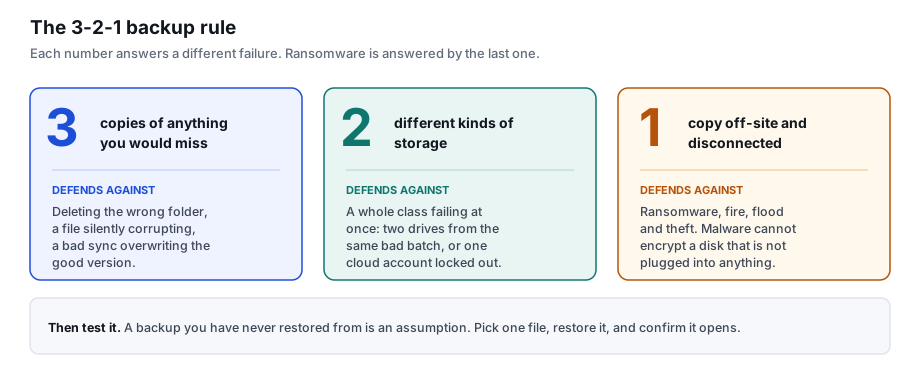
The disconnected copy is the one that defeats ransomware, because malware cannot encrypt a disk that is not plugged into anything. A continuously synced cloud folder is convenient but is not that copy: if a file is encrypted locally, the sync dutifully propagates the encrypted version. Versioned cloud storage helps, provided you know how to roll back and have tried it.
And test it. Pick one file, restore it, open it, confirm it is intact. A backup nobody has ever restored from is an assumption.
3. Turn on two-factor authentication, starting with email
Two-factor authentication means a password alone is not enough to get in. It is the single most effective account protection available to a consumer, and it is free.
Start with your email account, and do not be talked out of that order. Email is the master key: the password reset link for almost every other account you own arrives there. An attacker with your inbox does not need your bank password, because they can ask for a new one. Then do banking and payment accounts, then anything holding a saved card.
On the choice of second factor: an authenticator app or a hardware security key is meaningfully stronger than a code sent by SMS, because SMS can be redirected by a SIM-swap attack. That said, SMS two-factor is enormously better than none. Use what you will actually use, and improve it later.
4. Use a different password everywhere, which means using a manager
When a service is breached, the email-and-password pairs are compiled into a list and replayed automatically against hundreds of unrelated sites. This is credential stuffing. It is not aimed at you personally, it is aimed at everyone at once, and the only thing that stops it is that your password does not work anywhere else.
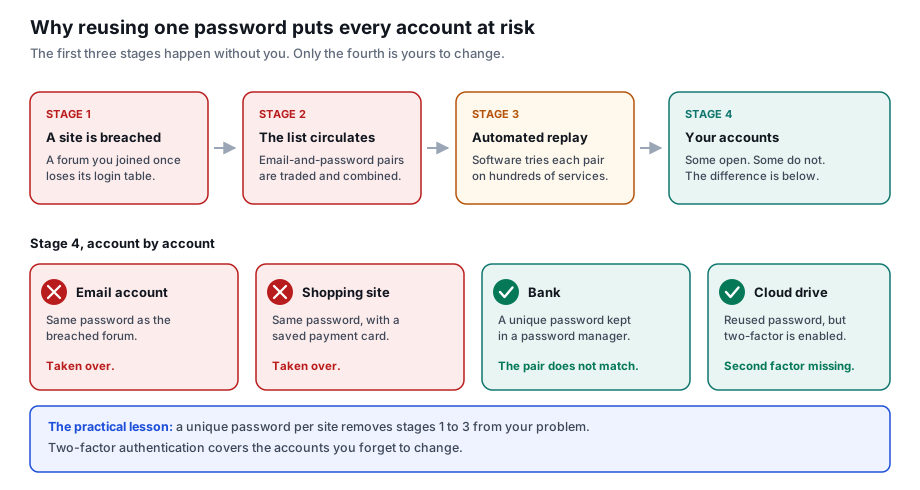
A unique password per site is not something human memory can deliver, so a password manager is not a luxury but the mechanism that makes the rule possible. Your browser has one built in and it is free; the standalone ones offer more and some are also free; several security suites include one. Any of them beats reusing a password. Protect the manager itself with a long unique master password and a second factor, because it is now the one credential that matters.
Length beats complexity for the passwords you do have to remember. Four or five unrelated words are easier to recall and harder to crack than a short string of substituted characters.
5. Learn to recognise manipulation, not just malware
The most effective attacks do not break software. They persuade you to act: to click, to pay, to install, to read out a code. Technical defences cannot help much once you have been convinced, which makes this the habit with the highest return.
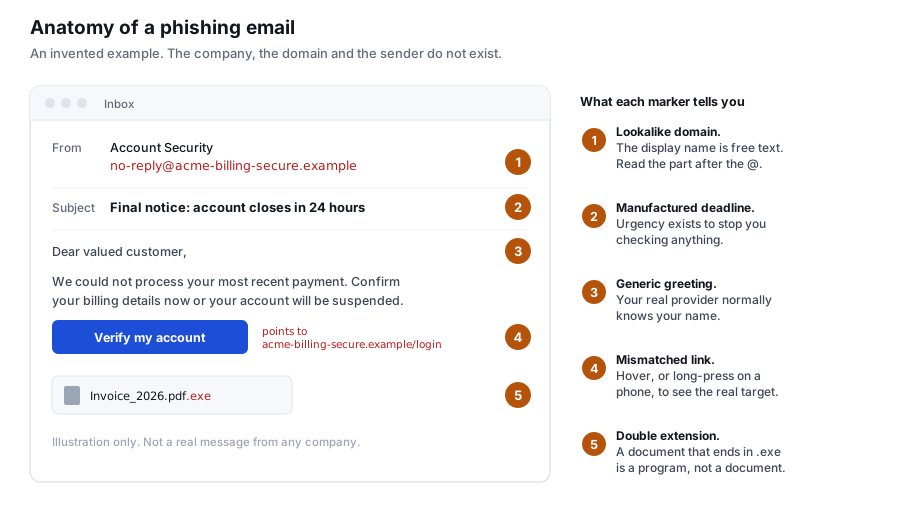
The reliable signal is not spelling or a clumsy logo — those have largely been fixed, and generative tools have finished the job. It is manufactured urgency combined with an unusual request. An account closing in 24 hours, a parcel held for a small fee, a colleague who needs gift cards immediately, a call from your bank asking you to move money to a “safe account”. Urgency exists to stop you checking, which tells you exactly what to do: stop and check.
The habit that covers nearly all of it: never act through the channel that contacted you. Do not click the link in the message, do not call the number in the message, do not continue the call you received. Close it, and reach the organisation the way you normally do — the app you already have, the address you already know, the number on the back of your card. A genuine request survives this. A fraudulent one does not, which is why the caller will push back against it.
Where security software fits
After those five, not instead of them. Antivirus software catches the malicious file you did download, blocks a known bad address before it loads, and gives you a second chance when a habit slips. That is worth having. It does not patch your router, restore files you never backed up, or stop you typing your password into a convincing fake login page.
Windows includes Microsoft Defender at no cost, and it is tested by the same independent laboratories as the paid products. A paid suite buys you additional components — typically a password manager, a firewall with more control, backup, sometimes a VPN — and a support line. Whether that bundle is worth the renewal price is a reasonable question to ask, and the answer is not automatically yes. Our article on Norton AntiVirus Plus works through one such plan in detail, including the parts it does not include. That article does carry partner links, and says so.
Three things that are not worth your attention
- “Registry cleaners” and PC optimisers. They fix a problem modern systems do not have, and some are malware.
- Running two real-time antivirus products at once. They fight each other and you get less protection, not more.
- Changing every password every 90 days. Guidance moved away from forced rotation years ago: it drives people towards predictable variations. Change a password when there is a reason to — a breach, a suspicion, a shared device.
Further reading
- ENISA, the EU Agency for Cybersecurity — enisa.europa.eu
- Europol, Internet Organised Crime Threat Assessment — europol.europa.eu
- AV-TEST, independent comparative antivirus testing — av-test.org
- AV-Comparatives — av-comparatives.org
Written by Sandra Adams. Published 21 September 2026. Corrections: info@vestrova.online. All illustrations are original SVG diagrams drawn for this site.